SASSA Status Check With USSD Code

South Africans who apply for SASSA grants often want to check the status of their application or payments. Many do not have smartphones or internet access. SASSA understands this problem. That’s why it offers a simple way to check your status using a USSD code. You do not need data or Wi-Fi. You only need a mobile phone.
In this guide, you will learn how to use the USSD code to check your SASSA status. The process is easy, fast, and works on almost all phones in South Africa. This article will also explain how the system works, what information you will see, and what to do if you face any problems.
What Is a USSD Code?
USSD stands for Unstructured Supplementary Service Data. It is a system that mobile networks use. It helps users interact with services by typing codes starting with * and ending with #.
You may have used USSD before. For example, when checking airtime balance with *123#, that is USSD. Now, you can also use it to check your SASSA status.
Why Use the USSD Code for SASSA?
Many SASSA applicants do not have access to the internet or smartphones. Visiting a SASSA office takes time. USSD helps you avoid long lines and delays. Here are key reasons to use the USSD method:
- Works on all types of mobile phones
- No internet connection required
- Free or extremely low cost
- Available 24/7
- Provides results in less than a minute
Which SASSA Grants Can You Check with USSD?
The USSD code works for the following SASSA grants:
- SRD R370 (Social Relief of Distress)
- Older Persons Grant
- Disability Grant
- Child Support Grant
- Care Dependency Grant
- Foster Child Grant
This article will focus mostly on the SRD R370 grant. But the USSD method works for other grants too.
What You Need Before You Dial the Code
Before you use the USSD code, make sure you have:
- A mobile phone with signal
- The mobile number you used to apply for the grant
- Your South African ID number
Note: If you applied using someone else’s number, you must use that same number to check your status.
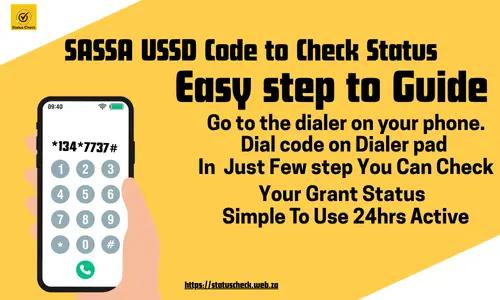
SASSA USSD Code to Check Status
To check your SASSA SRD R370 status with a USSD code, follow these steps:
- Go to the dialer on your phone.
- Type
*134*7737#and press the call button. - Wait for the menu to appear.
- Choose the option to check your application status.
- Enter your South African ID number when asked.
- Confirm your mobile number.
- You will see your status on the screen.
The system may ask a few more questions to confirm your identity. This helps protect your personal data.
What You Will See After Dialing the Code
Once you enter your details, the system will show your current status. The result may show:
- Approved – Your grant is accepted. You will see the payment date.
- Pending – Your application is still under review.
- Declined – Your application was not successful. The reason will be shown.
- Failed – Your application or grant was stopped.
If approved, the system may also show:
- The payment month
- The payment date
- Your selected payment method (e.g., bank account or Post Office)
How Often Can You Check the Status?
You can check your status as often as you like. However, SASSA updates the system once per month. So if your status is still pending, wait a few days before checking again.
It’s best to check your status once a week until you see an update.
What If You Get an Error or No Result?
Sometimes, the system may not work. You may see a blank screen or an error message. Here are common problems and how to fix them:
1. Wrong ID or Phone Number
Double-check your ID number and the mobile number you used to apply. If you use a different number, the system will not show your status.
2. USSD Code Not Working
Make sure you are dialing *134*7737#. Type it exactly like this. Do not add extra spaces or symbols.
3. Busy Network
If the system is busy, try again after 5 to 10 minutes. USSD services can slow down during peak hours.
Advantages of Using USSD for SASSA
USSD is useful for many people. Here are the top benefits:
- No smartphone or app needed
- Saves time and transport costs
- Works in rural and urban areas
- Quick and simple steps
- Reduces pressure on SASSA offices
How to Change Your Details If Needed
Sometimes, you may need to update your phone number or banking details. You cannot change this via USSD. You must visit the SASSA website or a local office.
But you can check the latest status using the USSD code at any time.
How Safe Is the USSD Method?
The USSD system is safe. It uses your phone number and ID to confirm your identity. Always use your own phone. Do not share your ID number with anyone else. If you lose your phone or SIM card, update your contact info at a SASSA office.
Other Ways to Check SASSA Status
Besides the USSD code, here are other ways to check your status:
1. Online at the SASSA Website
Visit https://srd.sassa.gov.za/sc19/status and enter your ID and mobile number.
2. WhatsApp
Send a message to 082 046 8553 and follow the steps.
3. SASSA Call Centre
Call 0800 60 10 11 to speak with an agent.
4. Visit a SASSA Office
This should be your last option if the other methods do not work.
Can You Reapply or Appeal Using USSD?
No. The USSD method is only for checking your status. If your grant is declined, you must appeal online within 30 days. Visit https://srd.dsd.gov.za/appeals.
Frequently Asked Questions (FAQ)
Is the USSD code free?
Yes. SASSA covers the cost. If your network charges you, it should be less than R0.20.
Can I check for someone else?
No. The system only shows results for the ID and number used in the application.
My status says “pending” for a long time. What should I do?
Wait for a few more days. If it stays the same for over 3 weeks, contact SASSA.
My phone was lost. Can I check status with a new number?
No. You must use the original number used during the application.
Can I use the USSD code from any network?
Yes. The code works on Vodacom, MTN, Cell C, Telkom, and others.
Conclusion
Checking your SASSA status with a USSD code is fast and easy. You only need your ID number and the phone you used to apply. Dial *134*7737#, follow the steps, and see your results in seconds.
This method is perfect for those without internet. It helps people in both rural and urban areas. If your application is pending or declined, don’t worry. You can recheck later or appeal online.
Make sure to keep your ID number and phone safe. Avoid sharing your details with others. Use the USSD method regularly to stay updated on your SASSA payments.